Pipeline versioning
Seqera's pipeline versioning system captures configuration changes as new draft versions of the pipeline, ensuring configuration traceability and execution reproducibility. Users with Maintain or higher permissions can edit and publish draft versions, creating published versions that teams can reference and launch consistently.
For deterministic and reproducible pipeline execution, use commit ID pinning for published pipeline versions. This ensures the same workflow code is used across all launches of that version.
When you add a new pipeline to Seqera, the first default version of that pipeline is automatically published.
New draft versions are automatically generated during pipeline edit or launch when you modify the following:
-
All pipeline schema parameters, unless the
track_changesschema configuration for a given property is set tofalse.infoChanges to all pipeline schema parameters during pipeline edit or launch trigger a new version by default i.e. the default for parameters is assumed as
"track_changes": true. The intent with pipeline versioning is to allow the common variable inputs (e.g. fastq files) and outputs (e.g. outputDir) to be omitted for consideration during versioning. To enable this behavior for specific parameters, add"track_changes": falseto the parameter property definition in the schema:"track_changes": false
}For nested parameters,
track_changesis supported at the leaf node level:"nestedParam": {
"type": "object",
"properties": {
"leafParam": {
"type": "string",
  "track_changes": false
}
}
} -
Fields in the pipeline Edit form, excluding:
- Name
- Image
- Description
- Labels
- Resource labels
-
Pipeline schema selection (see Building pipeline schema files)
Published versions provide a stable reference for team-wide pipeline launches. Users with Maintain or higher permissions can publish a draft version, giving it a name and optionally setting it as the default version. This makes important configurations easy to identify, share, and promote across your team.
A pipeline's default version is shown in the Launchpad and automatically selected during launch.
Seqera maintains a history of all draft and published versions, providing an audit trail of pipeline evolution.
Seqera Platform schema
Users with Maintain or higher permissions can upload a nextflow_schema.json file to Seqera Platform to control which pipeline parameters appear in the launch form. Changes to the Seqera Platform schema trigger a new draft version of the pipeline.
For more information, see Building pipeline schema files.
Manage pipeline versions
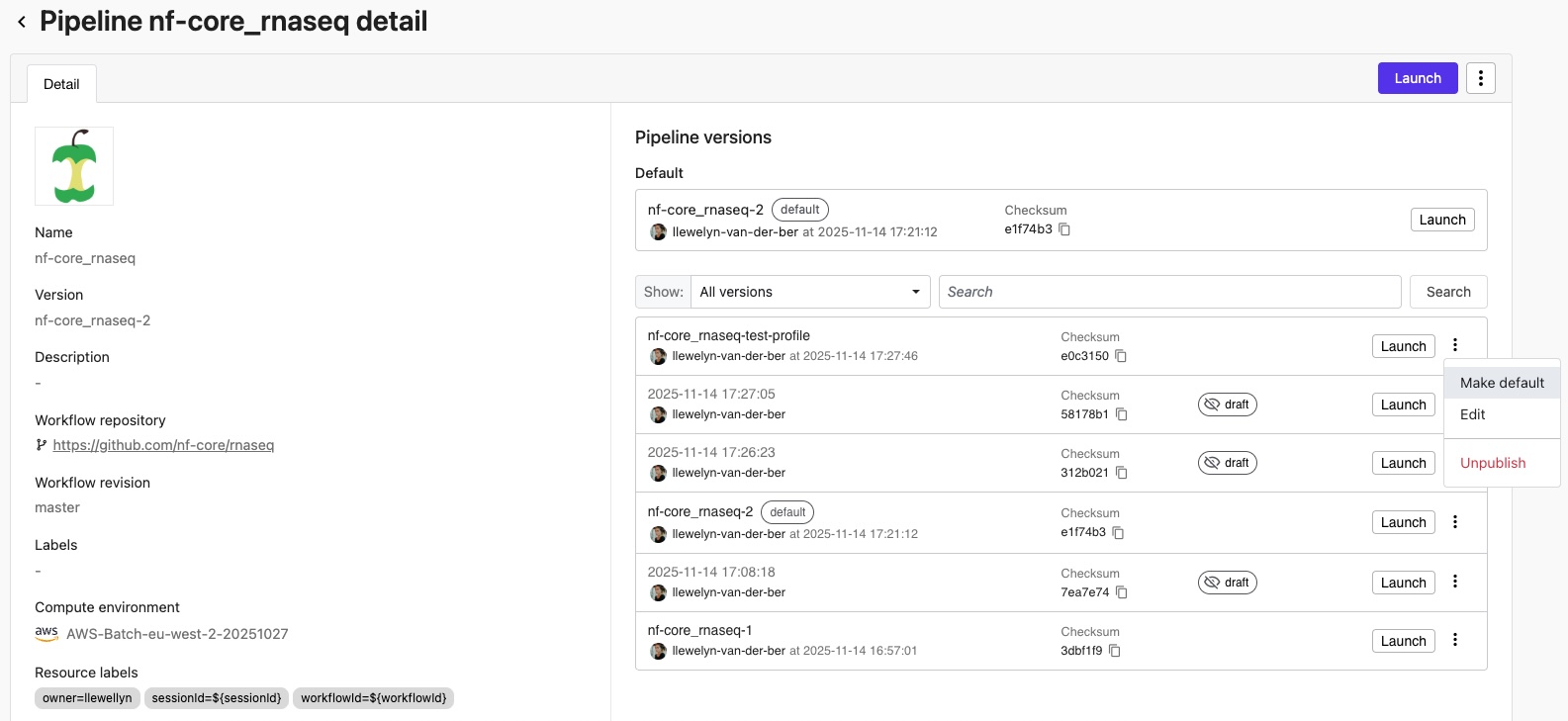
Select a pipeline from the workspace Launchpad to open the pipeline's details page. From here, users with Maintain or higher permissions can:
- View version history: See a chronological list of all draft and published versions with creator, date, hash, and version ID.
- Use the drop-down next to Show: to display all versions, or filter by draft or published versions.
- Search for specific version names (freetext search), or use keywords to search by
versionId:,versionName:, orversionHash:(version hash).
- Manage draft versions:
- Select Publish from the options menu of a draft version to name this version and optionally make it the default version to launch from the Launchpad.
note
Draft versions created from workflow runs can only be published from the pipeline's original workspace. For shared pipelines, the Publish action is only available in the workspace where the pipeline was created.
- Select Edit to open the pipeline edit form and either save a new draft or publish the current draft version.
- Select Publish from the options menu of a draft version to name this version and optionally make it the default version to launch from the Launchpad.
- Manage published versions:
- Select Make default from the options menu of a published version to use this version for every pipeline launch.
- Select Edit to open the pipeline edit form and either save a new draft or update the current published version.
- Select Unpublish to turn this version back into a draft. Draft versions are still visible to launch users.
Individual versions cannot be deleted. This ensures that the pipeline configuration audit trail is immutable. However, published versions can be unpublished or have their names reassigned to different versions.
Changes made at launch time in a target workspace cannot be saved. Changes to versions can only be saved and published from the pipeline's original workspace.
Pipeline optimization
Pipeline optimization is available directly from the pipeline details page for the default version. Users with Maintain or higher permissions can:
- Optimize pipeline: Configure pipeline optimization settings for the default version from the Default section or the Edit pipeline form.
- Toggle optimization: Enable or disable optimization for a pipeline that has already been optimized.
- Customize profile: Modify the optimization profile settings when optimization is enabled.
To optimize specific non-default versions, use the Edit page for that version. Pipeline optimization settings apply per version and remain configured when you set a different version as the default.
Version hash
Seqera calculates a hash for each draft version based on its version-triggering parameters. This provides:
- Provenance tracking for audit and compliance requirements.
- Cryptographic verification that a workflow run's configuration matches its associated pipeline version.