Add pipelines
Add a pipeline to your workspace Launchpad so that workspace participants can launch it with preset settings.
A Launchpad pipeline combines a Nextflow pipeline Git repository, a compute environment, and launch settings such as the revision, config profiles, and parameters. Add a pipeline from Seqera Pipelines, or add any Nextflow pipeline from the Launchpad.
You need the following:
- An organization and workspace. See Set up your workspace.
- A workspace compute environment.
Add from Seqera Pipelines
Seqera Pipelines is a curated catalog of open-source Nextflow pipelines. When you add a pipeline from the catalog, Platform configures it to run on test data.
To add a pipeline from Seqera Pipelines:
- Open Seqera Pipelines and select Launch next to a pipeline.
- On the Cloud tab, select Login to get started and sign in with your Seqera account.
- Select the Organization, Workspace, and Compute Environment for the pipeline.
- Optional: Change the Pipeline Name and Pipeline Description. Pipeline names must be unique in a workspace.
- Select Add pipeline to your Seqera account.
The pipeline appears on your workspace Launchpad.
Add from the Launchpad
Add any public or private Nextflow pipeline Git repository to the Launchpad.
To add a pipeline:
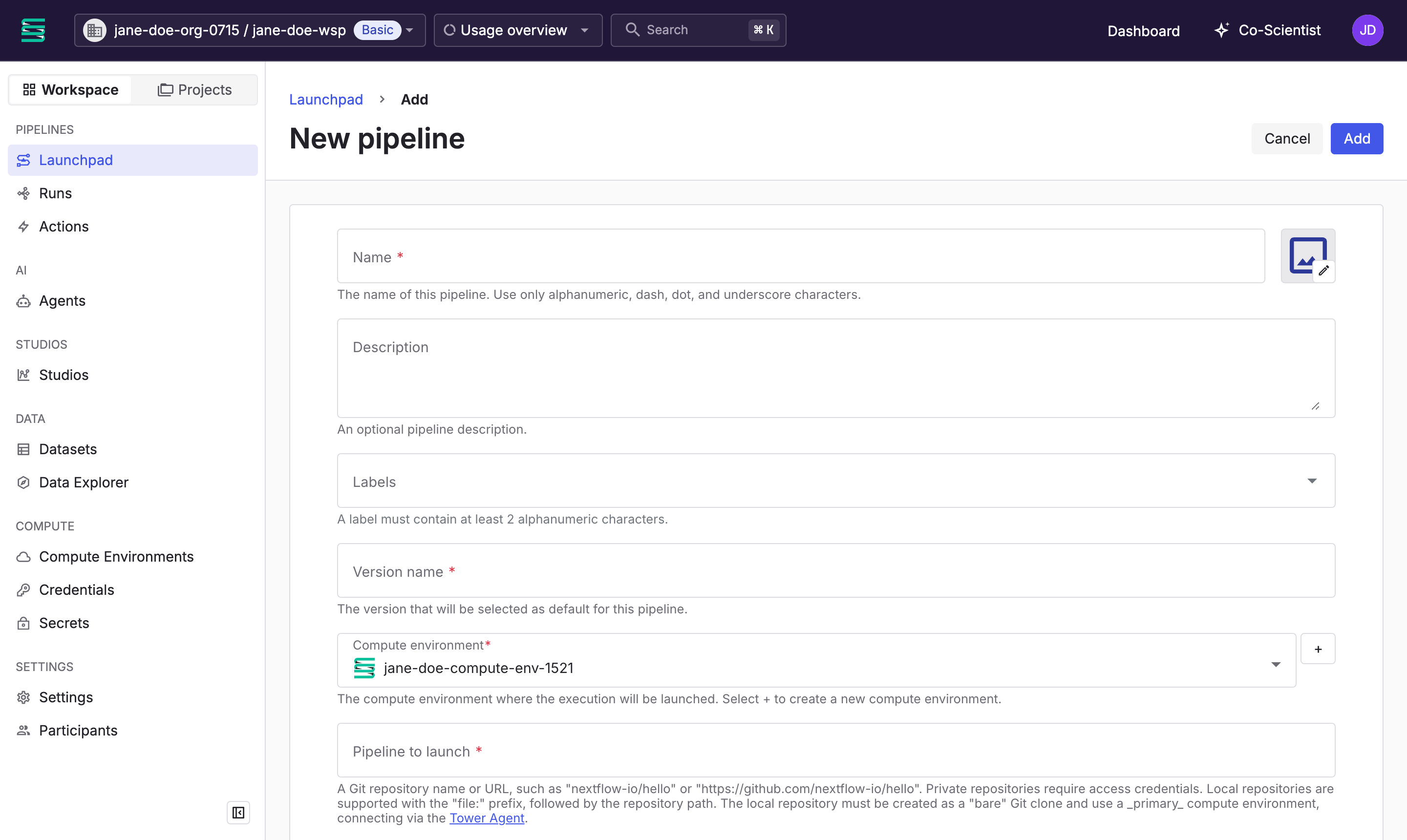
- In your workspace, select Launchpad, then select Add pipeline.
- Enter the pipeline details:
- Name: A name for the pipeline. Pipeline names must be unique in a workspace.
- Version name: A name for the first version of the pipeline, such as
rnaseq-3-21-0. - Compute environment: The workspace compute environment that runs the pipeline.
- Pipeline to launch: The Git repository name or URL, such as
nf-core/rnaseqorhttps://github.com/nf-core/rnaseq. Private repositories require Git credentials. - Revision: A Git tag, branch, or commit ID, such as
3.21.0. Set a tag or commit ID so that each run uses the same pipeline code.
- Optional: Set the remaining fields. Participants can change most of them at launch:
- Description and Labels: Help participants find the right pipeline.
- Image: Select the image next to Name to upload a PNG or JPG file under 200 KB. Without one, Platform uses the
manifest.iconfrom the pipeline'snextflow.config, then the GitHub organization avatar, then a generated icon. - Commit ID and Pull latest: Control which commit of the revision runs. See Git revision management.
- Work directory: The storage path for intermediate files. The default is the compute environment work directory.
- Config profiles: For example,
testto run an nf-core pipeline on its small test dataset. - Pipeline parameters: Default parameter values in JSON or YAML, such as the path to a reference genome.
- Resource labels: Name-value pairs applied to the cloud resources the run creates. See Resource labels.
- Advanced options: Nextflow configuration and pre-run and post-run scripts. See Advanced options.
- Select Add.
The pipeline appears on the Launchpad.
Next steps
Your pipeline is ready to launch:
- Add data for the pipeline to use.
- Launch the pipeline.